



C#のWinFormsプロジェクトで、フォントの文字を画像に変換する方法について備忘録的に投稿します。
フォントを画像にする
WinUIなどXamlを利用するプロジェクトの場合は、FontIconクラスが用意されています。
しかし、WinFormsプロジェクトの場合は、そのままでは使えないので指定されたフォントを画像にする必要があります。
具体的には、こんな感じになります。
private Bitmap SetFontIcon(string fontName, string glyph, int size, Color? iconColor = null)
{
    Bitmap bmp = new Bitmap(size, size);

    using (Graphics g = Graphics.FromImage(bmp))
    {
        g.TextRenderingHint = System.Drawing.Text.TextRenderingHint.AntiAliasGridFit;
        using (System.Drawing.Font font = new System.Drawing.Font(fontName, size, FontStyle.Regular, GraphicsUnit.Pixel))
        {
            Color color = iconColor ?? SystemColors.ControlText;
            using (Brush brush = new SolidBrush(color))
            {
                StringFormat sf = new StringFormat
                {
                    Alignment = StringAlignment.Center,
                    LineAlignment = StringAlignment.Center
                };
                RectangleF rect = new RectangleF(0, 0, size, size);
                g.DrawString(glyph, font, brush, rect, sf);
            }
        }
    }
    return bmp;
}
画像の受け渡しを行うのでメモリリークを防止するために、作成した画像は変数として保持しておいて、アプリ終了時にDispose処理を行う必要があります。
実際に呼び出す場合は、こんな感じでフォント名とサイズを指定して画像として取得します。
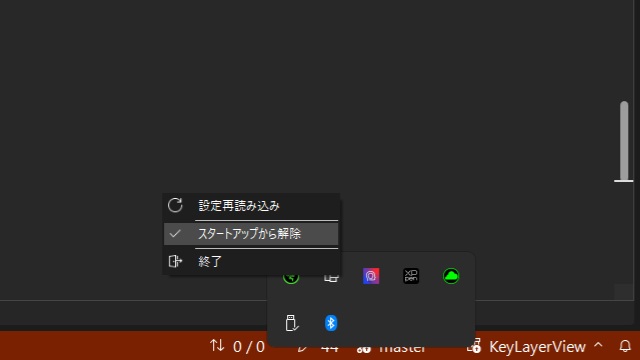
SetFontIcon("Segoe Fluent Icons", "\uE72C", 80, SystemColors.ControlText);作成した画像を、ポップアップメニューにアイコンなどに使えます。
まとめ
今回は、C#のWinFormsプロジェクトで、フォントから画像を作成する方法について書きました。
WinFormsプロジェクトの場合、WinUI3プロジェクトなどで利用可能なFontIconクラスは使えないので[System.Drawing.Font]アセンブリなどを使ってフォントを画像化することが可能です。
WinFormsプロジェクトでフォントを画像にしたい人の参考になれば幸いです。
スポンサーリンク
最後までご覧いただき、ありがとうございます。